
How to Track Stress on Apple Watch: The Complete Guide

Your Apple Watch tracks steps, heart rate, sleep stages, and even blood oxygen. But if you've ever looked for a "stress level" on your watch face, you know it's not there. Samsung Galaxy Watch has had one for years. Garmin shows you a stress score all day. Even the Oura Ring now measures cumulative stress over weeks.
Apple Watch? It gives you a Mindfulness app and a breathing exercise. That's it.
The frustrating part is that your Apple Watch already has the sensors to track stress — it just doesn't do anything with them out of the box. Here's how to change that.
Why Apple Watch Doesn't Have Stress Tracking (Yet)
Apple's approach to health has always been cautious. They'll add a feature when they're confident in its accuracy, not when competitors ship it first. That's why Apple Watch still relies on the Mindfulness app — which includes guided breathing, mood journaling (State of Mind), and reflection prompts — instead of a continuous stress score.
The problem? Breathing exercises are reactive, not proactive. They help you calm down after you realize you're stressed. A real stress tracker catches rising stress before you feel overwhelmed — and that requires continuous monitoring.
The hardware is already there. Your Apple Watch measures heart rate variability (HRV) throughout the day, and HRV is the single most reliable biomarker for stress that a wrist-worn device can capture.
How Stress Tracking Actually Works
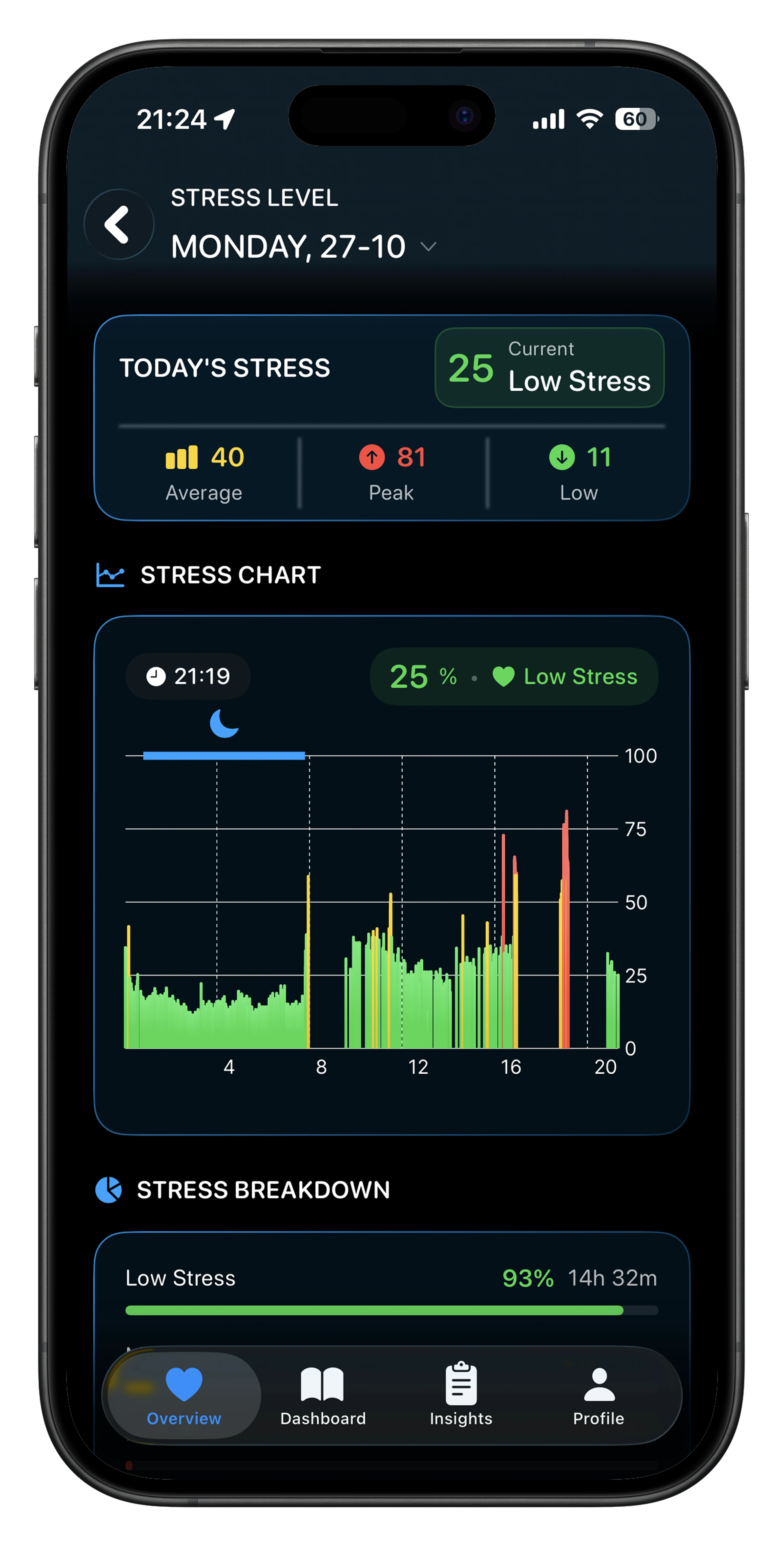 Livity shows your real-time stress level using Apple Watch HRV data.
Every stress tracker — whether it's WHOOP, Oura, Garmin, or a third-party Apple Watch app — works the same way under the hood: heart rate variability (HRV).
Your heart doesn't beat at a perfectly steady rhythm. The time between each beat fluctuates slightly — and those fluctuations reveal how your autonomic nervous system is doing.
- High HRV = your parasympathetic (rest-and-digest) system is active. You're relaxed and recovered.
- Low HRV = your sympathetic (fight-or-flight) system is dominant. Your body is under stress — whether from a workout, a bad night's sleep, or a tense meeting.
A 2024 study published in Frontiers in Computer Science confirmed that wearable devices can accurately detect stress in real-world settings using HRV data combined with other physiological signals. And a 2025 study in medRxiv found that HRV-based stress measurements were more reliable than self-reported stress questionnaires — meaning your watch may actually know you're stressed before you do.
Your Apple Watch already records HRV. The data sits in Apple Health. You just need an app that reads it and turns it into something useful.
📱 Livity turns your Apple Watch HRV into a real-time stress score — plus recovery, body battery, and sleep analysis. Try it free →
3 Ways to Track Stress on Apple Watch
1. Use a Dedicated Stress Tracking App
The fastest way to get a stress score on your Apple Watch is to install an app that reads your HRV data and calculates stress in real time. Here are the main options:
Livity (free to try) — reads your Apple Watch HRV and heart rate data to give you a continuous stress score alongside recovery, body battery, sleep analysis, and training load. It's the most complete option if you want WHOOP-level insights without paying for another device. Your data stays on your phone — nothing is uploaded to a server.
StressFace — a lightweight app that puts a stress score (1–10) directly on your watch face as a complication. Simple and free, but limited in what it tells you beyond the number.
Welltory — combines HRV, sleep, and activity data into stress reports. Good for people who want detailed analysis, though it requires a subscription for most features.
2. Monitor HRV Trends in Apple Health
If you don't want another app, you can track stress indirectly by watching your HRV trends in the Health app:
- Open Health on your iPhone
- Go to Browse > Heart > Heart Rate Variability
- Look at your daily and weekly averages
When your HRV drops consistently below your personal baseline, your body is under more stress. When it rises, you're recovering well.
The downside: Apple Health shows you raw HRV numbers in milliseconds. It doesn't tell you what they mean or whether your stress is high or low. You have to interpret the data yourself.
3. Use Apple's Mindfulness App (Limited)
Apple's built-in option is the Mindfulness app, which includes:
- Breathe — guided breathing sessions (1–5 minutes)
- State of Mind — log how you're feeling throughout the day
- Reflect — gratitude and perspective prompts
This isn't stress tracking — it's stress management. It helps you respond to stress but doesn't measure it. Think of it as the treatment without the diagnosis.
What to Look for in a Stress Tracking App
Not all stress apps are equal. Here's what separates a useful one from a gimmick:
- Continuous monitoring — spot-checking stress once a day isn't enough. Look for apps that track throughout the day, not just during manual readings.
- Baseline comparison — a stress score only matters relative to your normal. The app should learn your personal baseline over time.
- Actionable context — knowing your stress is "high" isn't helpful if you don't know why. The best apps connect stress data to your sleep, exercise, and recovery trends.
- Privacy — stress data is deeply personal. Check whether the app uploads your health data to external servers or keeps it on-device.
How to Actually Lower Your Stress Score
Tracking stress is only useful if you do something with the data. Here's what research and real-world experience show works:
Sleep is the biggest lever. A single night of poor sleep can drop your HRV by 10–20%. Consistent 7–9 hours at the same time each night is the most reliable way to keep stress levels down.
Exercise helps — but timing matters. A hard workout raises your stress score temporarily (that's normal). But exercising too close to bedtime or training without adequate recovery keeps your stress elevated for days.
Cut stimulants after 2 PM. Caffeine has a half-life of 5–6 hours. That 3 PM coffee is still affecting your nervous system when you try to sleep at 10 PM.
Breathwork actually works. The research backs this up: controlled breathing at 4–6 breaths per minute increases HRV and shifts your nervous system toward recovery. Apple's Breathe app is fine for this — you just need to use it consistently.
FAQ
Does Apple Watch have a built-in stress tracker?
No. As of watchOS 11, Apple Watch does not have a native stress score or stress level feature. The Mindfulness app offers breathing exercises and mood logging, but not continuous stress measurement. Rumors suggest Apple may add stress detection in watchOS 26, but nothing has been confirmed.
How accurate is HRV-based stress tracking?
HRV is the most validated wearable biomarker for autonomic stress. A 2024 systematic review found that wearable-based HRV measurements can reliably detect stress in everyday settings. However, accuracy varies by device and app — continuous monitoring is more reliable than one-off spot checks.
Is stress tracking on Apple Watch as good as WHOOP or Oura?
The Apple Watch hardware is comparable — it uses the same optical heart rate sensors. The difference is software. WHOOP and Oura have built-in stress algorithms. On Apple Watch, you need a third-party app like Livity or StressFace to get similar insights.
Can stress tracking help with burnout?
Yes. Tracking HRV trends over weeks can reveal chronic stress patterns before they escalate into burnout. If your HRV stays consistently below your baseline, it's a signal to adjust your workload, sleep, or recovery habits.
What's a normal stress level on Apple Watch apps?
Most apps use a 0–100 scale, where lower means more relaxed and higher means more stressed. "Normal" depends on your personal baseline — a score of 40 might be high for one person and normal for another. Focus on your own trends rather than absolute numbers.
Start Tracking Your Stress Today
Your Apple Watch already has the sensors — you just need the right app to turn that data into a clear stress score. Once you start tracking, you'll notice patterns you never saw before: how that afternoon coffee raises your stress, how a bad night's sleep follows you all day, or how a 5-minute breathing session actually shifts your numbers.
Livity turns your Apple Watch HRV data into a real-time stress score — alongside recovery, body battery, sleep, and training load. No Oura Ring, no WHOOP strap, no extra hardware. Your data never leaves your device. Free to try on the App Store.

iOS developer with 7+ years of experience and an active volleyball player. Built Livity after spending months looking for advanced recovery and sleep tracking that worked natively with Apple Watch — and finding nothing. Uses his own HRV, sleep, and training-load data every day to shape what Livity measures.
More from this authorStart Your Wellness Journey Today
Live Your Best Life
Join thousands of users who are already tracking their health with Livity.