7 Apple Watch Health Features You're Probably Not Using

Your Apple Watch is sitting on your wrist right now, collecting health data you've never looked at. Most people use it for notifications, step counting, and maybe the occasional workout. But underneath the surface, it's tracking heart rhythm patterns, respiratory changes, skin temperature shifts, and environmental noise — all while you sleep, work, and go about your day.
According to a 2025 meta-analysis published in npj Digital Medicine, the Apple Watch can reliably measure 14 different health metrics. Yet most users only interact with two or three of them.
Here are 7 Apple Watch health features you're probably not using — and why you should start.
1. The Vitals App — Your Morning Health Dashboard
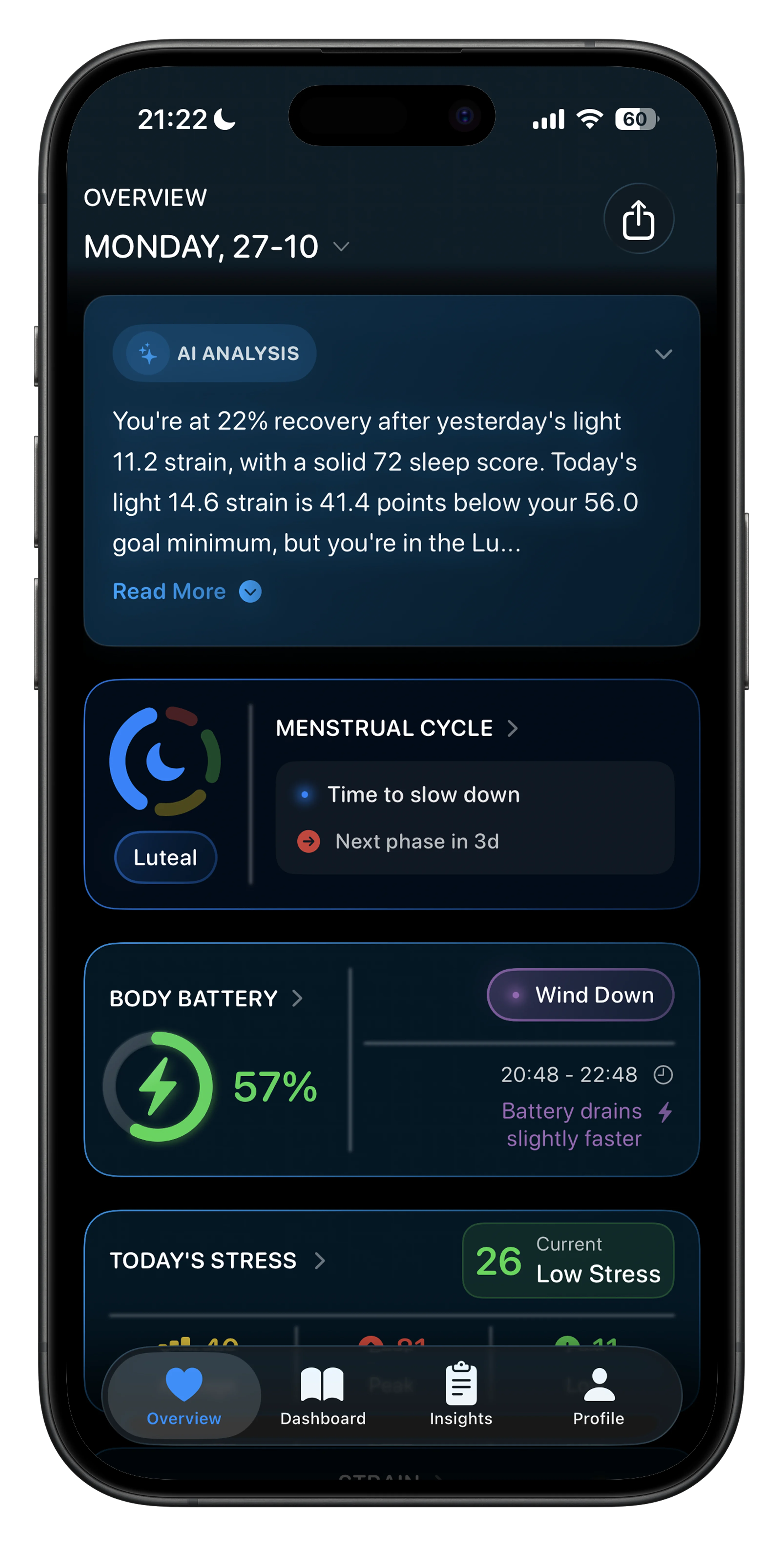 Livity takes the same overnight data and turns it into a clear recovery score, body battery, and stress level.
Apple introduced the Vitals app in watchOS 11, and most people have never opened it. That's a mistake — it's one of the most useful health tools on your wrist.
Every morning, Vitals shows you five metrics collected while you slept:
- Heart rate — your overnight resting average
- Respiratory rate — breaths per minute during sleep
- Wrist temperature — deviation from your personal baseline
- Blood oxygen (SpO2) — oxygen saturation levels
- Sleep duration — total time asleep
The real power is in the baseline comparison. The app learns your typical ranges over two weeks, then alerts you when two or more metrics fall outside your normal. That notification often arrives before you feel anything — catching illness, overtraining, or accumulated stress early.
How to set it up: Open the Vitals app on your Apple Watch and wear it to sleep for at least two weeks to build your baseline. Make sure Sleep Focus is enabled so the watch knows when you're in bed.
2. Heart Rate Variability (HRV) — The Metric Apple Hides in Plain Sight
Your Apple Watch measures HRV multiple times a day. It's one of the most important biomarkers for recovery, stress, and cardiovascular health. And Apple buries it deep inside the Health app where almost nobody finds it.
HRV measures the tiny time differences between heartbeats — higher variability means your nervous system is flexible and recovered, lower variability signals stress or fatigue. A 2025 study in Frontiers in Cardiovascular Medicine found that consistently low HRV (SDNN below 70ms) is associated with a 1.5–2.3x higher risk of cardiovascular events.
How to find it: Open Health on your iPhone → Browse → Heart → Heart Rate Variability. You'll see your readings in milliseconds, but Apple doesn't interpret them for you — it just shows raw numbers.
The problem: Apple records HRV but doesn't give you a stress score, recovery score, or any actionable insight from it. This is where third-party apps like Livity step in — reading your Apple Watch HRV data and turning it into a real-time stress level and recovery score, similar to what WHOOP and Oura offer.
3. Cardio Fitness (VO2 Max) — Your Fitness Age in One Number
VO2 max measures how efficiently your body uses oxygen during exercise — it's the gold standard for cardiovascular fitness and one of the strongest predictors of longevity. A landmark study from the Cleveland Clinic found that low cardio fitness is a stronger risk factor for death than smoking, diabetes, or heart disease.
Your Apple Watch estimates VO2 max during outdoor walks, runs, and hikes. Apple calls it "Cardio Fitness" and classifies you as Low, Below Average, Above Average, or High based on your age and sex.
How to find it: Open Health → Browse → Heart → Cardio Fitness. You'll see your score in mL/kg/min and a colored chart showing where you fall.
How to improve it: Track the trend over months, not days. Zone 2 cardio training (conversational pace running, cycling, or brisk walking) is the most efficient way to push your VO2 max up. If your score is in the "Low" range, consider it a wake-up call — it's one of the most modifiable risk factors for long-term health.
📱 Livity reads your Apple Watch health data and gives you stress scores, recovery, body battery, and training load — the insights Apple doesn't show you. Try it free →
4. Noise Monitoring — Protecting Your Hearing Automatically
Hearing loss is gradual, invisible, and irreversible. The World Health Organization estimates that over 1 billion young adults are at risk from unsafe noise exposure during recreational activities.
Your Apple Watch continuously measures ambient sound levels and can alert you when your environment exceeds safe thresholds — concerts, construction sites, loud gyms, even your commute on a noisy subway.
How to set it up: Open the Noise app on your Apple Watch, or go to Settings → Noise on your watch and enable notifications. You can set the threshold anywhere from 80 to 100 decibels. Most audiologists recommend 85 dB as the safe limit for extended exposure.
This feature runs passively in the background — you don't need to open any app. When it detects sustained loud noise, you get a tap on the wrist. Simple, silent, and potentially saving your hearing over decades.
5. Breathing Disturbances — Sleep Apnea Clues on Your Wrist
Starting with Apple Watch Series 10 and watchOS 11, your watch can detect breathing disturbances during sleep — subtle interruptions to normal respiratory patterns that may indicate conditions like sleep apnea.
The watch uses its accelerometer to pick up small wrist movements associated with disrupted breathing. It classifies your night as having elevated or not elevated breathing disturbances and tracks trends over time.
Why this matters: An estimated 936 million adults worldwide have obstructive sleep apnea, and the vast majority are undiagnosed. This isn't a medical diagnosis — but a persistent pattern of elevated breathing disturbances is a strong signal to talk to your doctor about a sleep study.
How to find it: Open Health → Browse → Respiratory → Breathing Disturbances. You need an Apple Watch Series 10 or Ultra 2 with watchOS 11 or later.
6. Wrist Temperature Tracking — Catching Illness Before You Feel It
Your Apple Watch Series 8 or later measures wrist temperature every five seconds while you sleep, building a baseline of your typical overnight temperature. When something shifts — illness, hormonal changes, jet lag, or overtraining — you'll see the deviation before symptoms appear.
This is the same principle that makes the Oura Ring's temperature tracking popular, except your Apple Watch does it too, and most people don't realize it.
Where to find it: Open Health → Browse → Body Measurements → Wrist Temperature. After about five nights of wear, you'll see a baseline and nightly deviations measured in degrees.
For women's health: The temperature sensor also powers cycle tracking in the Health app, estimating retrospective ovulation by detecting the post-ovulatory temperature rise caused by progesterone. No separate device needed.
7. The Health Checklist — See Everything You're Missing
This is the most underused feature of all, and it takes 30 seconds. Apple Health has a built-in checklist that shows you every health feature available on your devices — and which ones you haven't turned on yet.
How to find it: Open Health on your iPhone → tap your profile picture (top right) → Health Checklist.
You'll see a list that includes:
- Fall Detection
- Heart rate notifications (high and low)
- Irregular rhythm notifications (atrial fibrillation)
- Medication tracking and reminders
- Medical ID for emergencies
- Walking Steadiness notifications
Most people have fewer than half of these enabled. Spending a few minutes turning them on gives you a safety net that works silently in the background.
What Apple Watch Still Can't Do (and How to Fix It)
Apple Watch hardware is impressive — but Apple's software leaves gaps that competitors like WHOOP and Oura fill by default:
- No stress score — your watch measures HRV all day but never tells you if you're stressed
- No recovery score — there's no morning readiness number telling you whether to push hard or rest
- No body battery — Garmin users get an energy level that depletes and recharges; Apple Watch doesn't
- No training load — WHOOP tracks strain and tells you when you're overreaching; Apple's version (added in watchOS 11) is limited to running
The sensors are all there. The data is being collected. It's just not being turned into anything useful.
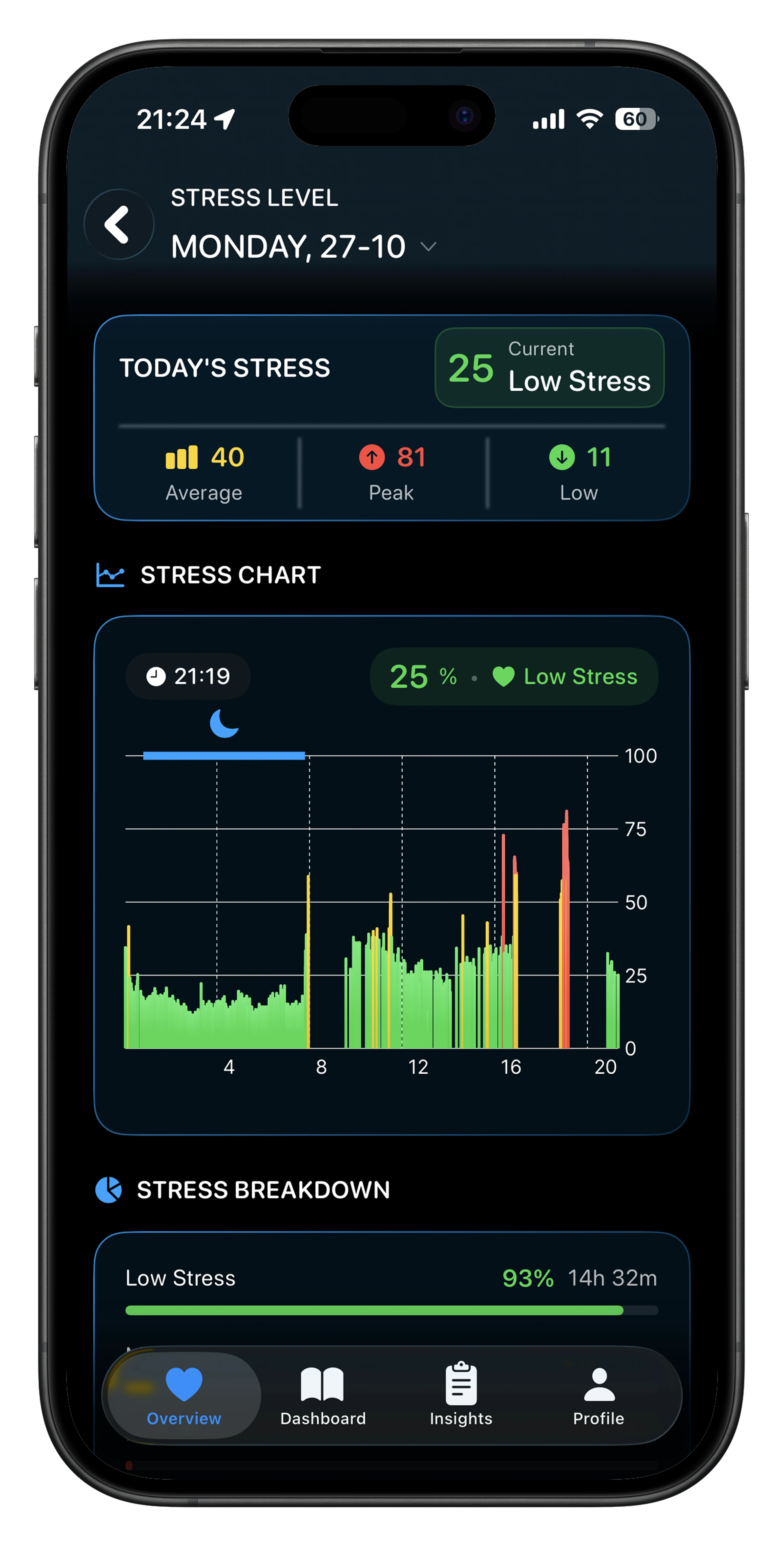 Livity reads your Apple Watch data and shows you what Apple won't — stress, recovery, body battery, and training load.
That's exactly what Livity does. It reads the health data your Apple Watch is already collecting — HRV, heart rate, sleep, activity — and turns it into a stress score, recovery score, body battery, and training load. The same insights you'd get from a WHOOP strap or Oura Ring, without buying any extra hardware.
And because Livity is privacy-first, your data never leaves your device. No cloud uploads, no account required, no selling your health data to third parties.
FAQ
What are the most underrated Apple Watch health features?
The Vitals app, HRV tracking, noise monitoring, and the Health Checklist are the most commonly overlooked. Most users never configure heart rate alerts, fall detection, or breathing disturbance tracking — features that can genuinely flag health issues early.
Does Apple Watch track stress?
Not natively. Apple Watch measures heart rate variability (HRV), which is the biomarker used for stress detection, but it doesn't calculate or display a stress score. You need a third-party app like Livity, StressFace, or Welltory to turn that HRV data into an actionable stress level.
Is Apple Watch as good as WHOOP or Oura for health tracking?
The hardware is comparable — Apple Watch uses the same optical heart rate sensors and measures HRV, temperature, and blood oxygen just like WHOOP and Oura. The difference is in software. WHOOP and Oura include built-in recovery scores, readiness scores, and stress tracking. On Apple Watch, you need an app like Livity to get the same insights.
How do I check my VO2 max on Apple Watch?
Open the Health app on your iPhone, go to Browse → Heart → Cardio Fitness. Your Apple Watch estimates VO2 max during outdoor walks, runs, and hikes. For the most accurate readings, do a brisk outdoor walk or run for at least 20 minutes with your watch on.
Can Apple Watch detect sleep apnea?
Apple Watch Series 10 and Ultra 2 (with watchOS 11+) can detect breathing disturbances during sleep, which may indicate sleep apnea. It's not a medical diagnosis, but persistent elevated readings are a reason to consult your doctor.
Unlock the Full Potential of Your Apple Watch
Your Apple Watch is already collecting the data — heart rate variability, sleep stages, skin temperature, respiratory patterns. The question is whether you're actually seeing it. Start by running through the Health Checklist, setting up the Vitals app, and checking your HRV trends. You'll be surprised how much your watch already knows about you.
And if you want the full picture — stress, recovery, body battery, and training load — without buying another wearable, Livity turns your existing Apple Watch data into the insights that Apple doesn't show you. Privacy-first, no extra hardware, free to try.

iOS developer with 7+ years of experience and an active volleyball player. Built Livity after spending months looking for advanced recovery and sleep tracking that worked natively with Apple Watch — and finding nothing. Uses his own HRV, sleep, and training-load data every day to shape what Livity measures.
More from this authorStart Your Wellness Journey Today
Live Your Best Life
Join thousands of users who are already tracking their health with Livity.