Apple Health sleep score explained: what it measures and what it means
Your Apple Watch silently collected data while you slept. In the morning, Apple Health shows you a breakdown — sleep stages, time asleep, maybe a heart rate graph. But what does any of it actually mean, and is there a score somewhere?
Short answer: Apple Health doesn't give you one single sleep score. What it does give you is richer — a breakdown of your sleep stages, duration, and physiological signals. Once you know how to read it, it tells you more than a number ever could. Here's the full picture.
What Apple Health tracks while you sleep
 Photo via Unsplash — Apple Watch worn overnight captures sleep stages, heart rate, and respiratory rate.
Apple Health pulls sleep data from Apple Watch (Series 4 or later, running watchOS 9 or later) using two main sensors:
- Accelerometer — detects movement and stillness to identify when you're asleep
- Optical heart rate sensor — measures heart rate variability and pulse rate to identify which sleep stage you're in
The result is a nightly report with four key metrics:
- Time in Bed — how long you were lying down
- Time Asleep — how long you were actually asleep (time in bed minus awake time)
- Sleep Stages — breakdown of REM, Core, Deep, and Awake periods
- Heart Rate & Respiratory Rate — your physiological state during sleep
The Sleep Stages section is where most of the insight lives.
The 4 sleep stages Apple Watch detects
Starting with watchOS 9, Apple Watch tracks four distinct stages throughout the night. Each one serves a different biological purpose.
🔵 Awake
Brief windows where you're conscious — rolling over, checking the time, or a light waking you don't fully remember. Healthy sleepers have 5–15% awake time across the night. More than that is a sign your sleep quality is suffering.
🟢 Core (Light Sleep)
The bulk of your night — typically 50–60% of total sleep time. Core sleep is your brain's maintenance mode: memories start consolidating, your body temperature drops, and your muscles relax. It's not glamorous but it's essential.
🟣 Deep Sleep
The most restorative stage. Your heartbeat slows, breathing becomes rhythmic, and your body releases growth hormone to repair tissue and strengthen the immune system. Deep sleep typically accounts for 13–23% of total sleep in healthy adults. Less than 10% consistently? That's a flag worth paying attention to.
🟡 REM Sleep
Rapid Eye Movement sleep is where vivid dreams happen — and where your brain does its heaviest cognitive work. REM is critical for memory consolidation, emotional regulation, and creative thinking. It makes up roughly 20–25% of total sleep and becomes more frequent in the second half of the night. This is why cutting your sleep short by even an hour disproportionately kills your REM.
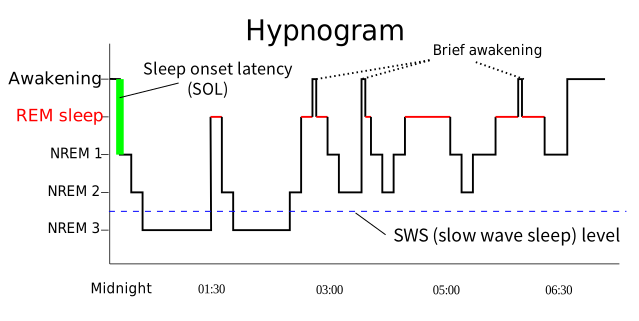 Source: Wikimedia Commons (CC BY-SA 3.0, RazerM) — a typical night cycles through ~5 sleep cycles, with deep sleep heaviest early and REM lengthening toward morning.

How to find your sleep data in Apple Health
- Open the Health app on iPhone
- Tap Browse → Sleep
- Tap Show More Sleep Data to see full stage breakdown
At the top you'll see a color-coded bar chart of last night's stages. Swipe left for previous nights. Scroll down for heart rate, respiratory rate, and weekly averages.
Tip: The weekly view is more useful than any single night. One bad night means nothing; a pattern means something.
What "good" sleep actually looks like in Apple Health
Apple doesn't give you a score, but you can grade yourself against these benchmarks:
| Metric | Healthy range |
|---|---|
| Total sleep | 7–9 hours (adults) |
| Deep sleep | 13–23% of total |
| REM sleep | 20–25% of total |
| Awake time | Under 10–15% |
| Resting heart rate | 40–60 bpm |
| Respiratory rate | 12–20 breaths/min |
If your deep sleep is consistently under 10% or your REM is barely showing up, those are the levers worth pulling.
Why Apple Health doesn't have a sleep score — and what to do instead
Apple deliberately shows raw data rather than a single number. That's not a limitation — it's a privacy and transparency decision. But raw data has a UX problem: most people don't know what to do with a 78-minute core sleep reading.
This is exactly the gap that sleep score apps fill. Apps like Livity take your Apple Health sleep data — stages, heart rate, HRV, consistency — and synthesize it into a single recovery score you can act on. The score accounts for how well you slept relative to your own baseline, which is far more meaningful than absolute numbers.
No extra hardware required. Your Apple Watch is already collecting everything needed.
 Photo via Unsplash — consistent sleep habits make the biggest difference in your Apple Health sleep data.
5 ways to actually improve your sleep metrics
Once you're reading your Apple Health data consistently, here's how to move the needle:
Lock in a consistent wake time — your circadian rhythm responds to your wake time more than your bedtime. Same wake time every day, even weekends.
Protect your last 90 minutes — REM cycles lengthen toward morning. Cutting sleep short by even an hour slashes your REM by 20–30%.
Keep your bedroom cold — core body temperature drops during deep sleep. A cool room (around 18°C / 65°F) helps trigger and maintain it.
Watch your resting heart rate trend — if it's creeping up week over week, you're accumulating stress or illness before you feel it consciously.
Cut alcohol — alcohol puts you to sleep faster but fragments your sleep architecture. It dramatically suppresses REM and deep sleep in the second half of the night. Your Apple Health data will show this clearly.
Frequently Asked Questions
Does Apple Watch need to be charged overnight to track sleep? Yes — the watch needs battery to track sleep. Apple recommends charging it for about 30 minutes before bed. Some users charge during their wind-down routine. The watch typically uses around 15–20% battery overnight in sleep tracking mode.
What Apple Watch model supports sleep stages? Sleep stages require Apple Watch Series 4 or later running watchOS 9 or later. Older models can still track time asleep and basic sleep data, but not the REM/Core/Deep breakdown.
How accurate is Apple Watch sleep tracking? Consumer wearables are generally accurate for total sleep time and broad stage detection, but they're not clinical-grade. The gold standard is polysomnography (PSG) — a lab sleep study. Apple Watch is best used to track trends in your own data rather than making medical diagnoses from any single night.
Why is my deep sleep so low? Common culprits: alcohol, inconsistent sleep schedule, sleep apnea, high stress, or simply not getting enough total sleep. If you're regularly under 45–60 minutes of deep sleep per night, it's worth discussing with a doctor — especially if you're tired despite 7+ hours in bed.
Can I track sleep without wearing Apple Watch to bed? Apple Health can record manual sleep data or pull from third-party apps, but the sleep stage breakdown requires the Apple Watch worn during sleep. No watch = no stage data.
The bottom line
Apple Health gives you the raw material — sleep stages, duration, heart rate, respiratory rate. It's not a score, it's a dataset. And once you know what you're looking at, it's genuinely powerful.
The key things to track: total sleep time (aim for 7–9 hours), deep sleep (aim for 13–23%), and REM sleep (aim for 20–25%). Everything else flows from those three.
If you want that data turned into a single, actionable recovery score each morning — along with HRV, body battery, and stress tracking — Livity does exactly that using your Apple Watch data, no Oura or Whoop needed. Download Livity free on the App Store.